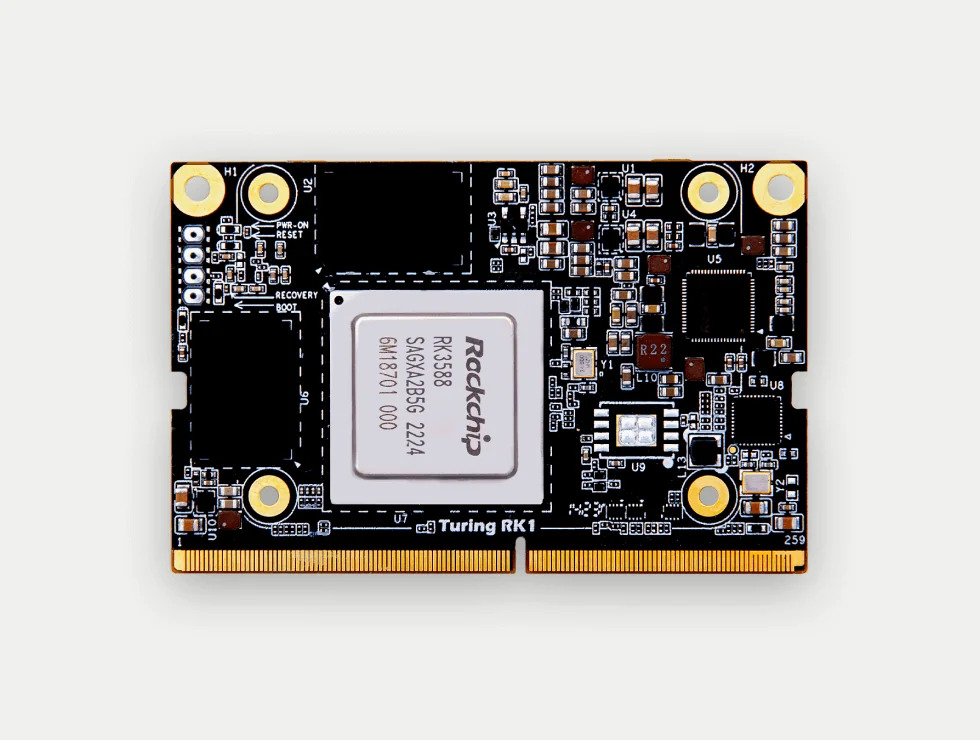
Building a Kubernetes-Native Media Server on the Turing Pi 2
This post is about setting up a kubernetes-native media server on the home cluster. Media in my house used to be served by a desktop PC running Kodi and UPnP, and turning all of that into proper kubernetes services seemed like a fun build, so I did it. By the end of this post we’ll have downloading, organizing, and serving media all running as ordinary kubernetes services on top of erasure-coded storage, with real HTTPS certificates and no UPnP anywhere. There is a good amount of hindsight baked into the configurations you’ll see below, and I’ll point out the places where I lost evenings to debugging as we go so that hopefully you won’t have to repeat them.
The cluster since the last posts
If you read the original two-part series about the Turing Pi 1, the cluster has been through a full generational upgrade since then. The current lineup is:
- A Turing Pi 2 carrying four Turing RK1 modules (
rk1-1throughrk1-4), each with an 8-core RK3588, 32 GB of RAM, and a 500 GB NVMe drive. These are the k3s control-plane nodes and, thanks to the NVMe drives, also the storage nodes. - A SolidRun HoneyComb LX2 (16-core Cortex-A72, 64 GB of RAM, a stack of SATA SSDs) named
godrick, which acts as the big worker node. - The VisionFive riscv board from the original posts, still hosting the external postgres database for the k3s control plane.
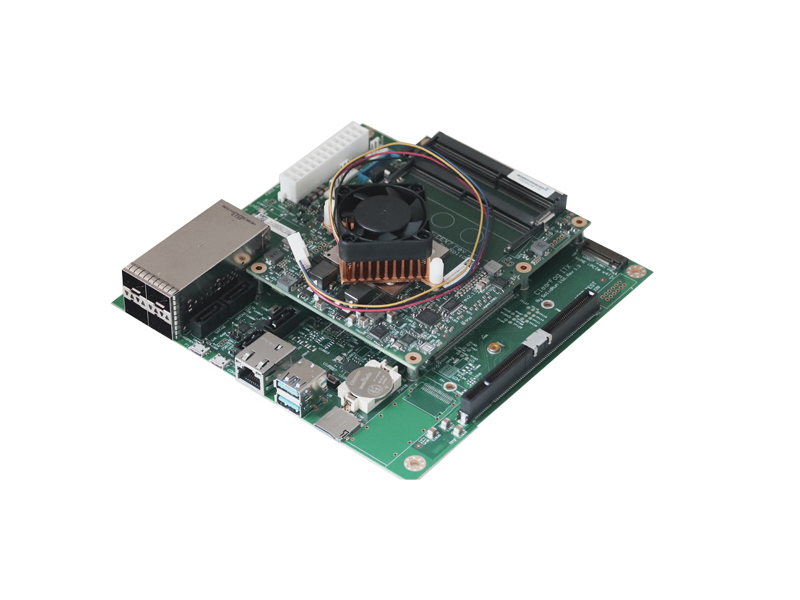
The supporting services are the same cast as the original posts, just newer: k3s (v1.33 at the time of writing) in high-availability mode across the four RK1s, metallb handing out LoadBalancer IPs, traefik as the ingress controller, and cert-manager managing certificates. The new addition since those posts is rook, which runs a ceph cluster on the four NVMe drives. That part matters quite a bit for this build, as you’ll see shortly.
I still control everything through the same style of aliases from part 1:
alias k3sctl="kubectl --kubeconfig <the-path-to>/kubeconfig"
alias k3shelm="helm --kubeconfig <the-path-to>/kubeconfig"
The plan
The kubernetes media server stack is a fairly standard quartet these days1:
- Jellyfin is the media server itself, free and open source.
- qBittorrent is the download client.
- Radarr manages the movie library.
- Sonarr manages the TV library.
On the client side the TV keeps running Kodi, but gains the Jellyfin for Kodi add-on. The add-on talks to the server over plain HTTPS, which means there is no DLNA and no SSDP multicast anywhere in this setup, and therefore no need for hostNetwork tricks to make discovery protocols cross the pod network. If you read other write-ups about media servers on kubernetes you’ll find that most of the ugly parts come from trying to make UPnP discovery work inside the cluster network, so I recommend simply not using it at all.
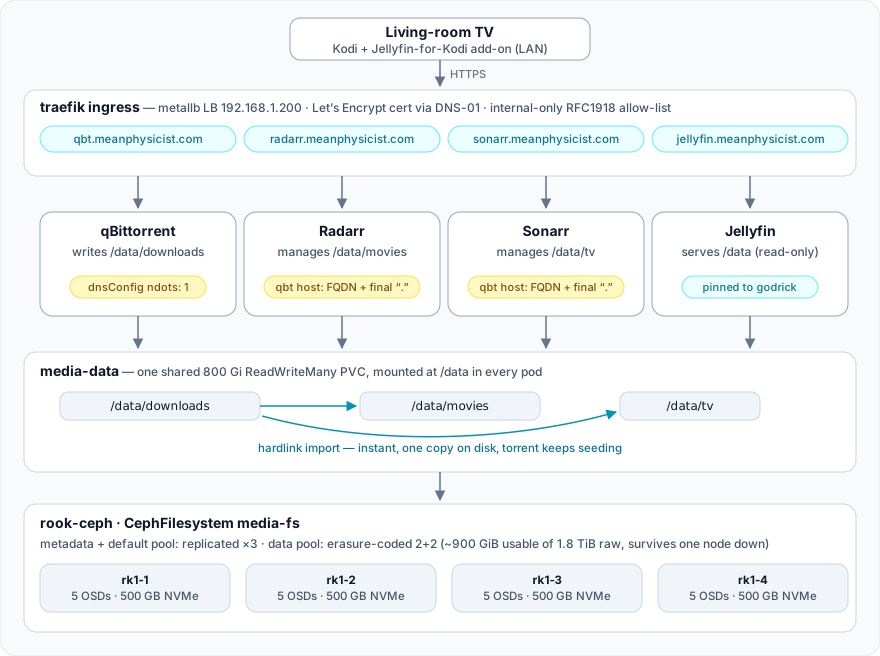
The most important design decision in the whole setup is that downloads and the media library live on one shared filesystem, in one volume, mounted at /data in every pod. When radarr or sonarr imports a completed download it does not copy the file into the library, it creates a hardlink. The import is instant, the file exists once on disk, and the original stays in the download directory so the torrent keeps seeding. If you split downloads and the library into separate volumes you silently lose all of this: every import becomes a full copy that is slow and temporarily needs double the space.2
Here is the whole architecture in one figure:
Setting up storage
The stack needs two different kinds of storage:
- App config volumes. Each application keeps its state in sqlite databases, which are small, hot, and want low-latency replicated storage.
- The media volume itself. Hundreds of gigabytes of large, rarely-written files that must be mounted read-write-many (RWX) by pods on different nodes.
Ceph, through rook, handles both of these with one filesystem and two data pools. Media files are large and cold, so paying the 3x overhead of replication on them is wasteful. An erasure-coded 2+2 pool instead stores every object as two data chunks plus two coding chunks spread across the four nodes, which costs only 2x the raw space and still survives a whole node going down. The filesystem metadata and the config volumes stay on ordinary replicated pools.3
The interesting parts of storage.yaml look like this:
apiVersion: ceph.rook.io/v1
kind: CephFilesystem
metadata:
  name: media-fs
  namespace: rook-ceph
spec:
  metadataPool:
    replicated:
      size: 3
  dataPools:
    - name: default        # first pool must be replicated
      replicated:
        size: 3
    - name: ec22           # the bulk-media pool
      erasureCoded:
        dataChunks: 2
        codingChunks: 2
  preserveFilesystemOnDelete: true
  metadataServer:
    activeCount: 1
    activeStandby: true
Two StorageClasses point at this filesystem, media-cephfs for the default replicated pool (app configs) and media-cephfs-ec which sets pool: media-fs-ec22 (the big volume). Then come the volume claims, one 800 Gi RWX claim for /data and a small RWO config claim for each app:
apiVersion: v1
kind: PersistentVolumeClaim
metadata:
  name: media-data
  namespace: media
spec:
  accessModes: ["ReadWriteMany"]
  storageClassName: media-cephfs-ec
  resources:
    requests:
      storage: 800Gi
After applying all of this you can check that ceph has carved the new pools out of the four NVMe drives (output trimmed to the relevant pools):
--- RAW STORAGE ---
CLASS     SIZE    AVAIL     USED  RAW USED  %RAW USED
nvme   1.8 TiB  1.7 TiB  104 GiB   104 GiB       5.57

--- POOLS ---
POOL               ID  PGS   STORED  OBJECTS     USED  %USED  MAX AVAIL
media-fs-metadata  17   16  245 MiB      471  735 MiB   0.04    535 GiB
media-fs-default   18   32  111 MiB      487  335 MiB   0.02    535 GiB
media-fs-ec22      19   32   43 GiB   11.12k   87 GiB   5.12    802 GiB
One more chore belongs to storage setup: the linuxserver containers run as user 1000, so the directory skeleton needs to be created and handed over to that user. The easiest way is from inside any pod that mounts the volume, once the applications below are running:
k3sctl exec -n media deploy/qbittorrent -- \
  sh -c 'mkdir -p /data/downloads /data/movies /data/tv && chown -R 1000:1000 /data'
Deploying the applications
All four deployments live in a single apps.yaml in a media namespace, and they are not very exciting: one replica each, strategy: Recreate (the config volumes are RWO, and you do not want a rolling update briefly running two pods that fight over a sqlite database), PUID and PGID set to 1000, and both volumes mounted. The full file is long but very repetitive, so here is just the jellyfin pod spec, which contains the only two interesting details:
    spec:
      affinity:
        nodeAffinity:
          preferredDuringSchedulingIgnoredDuringExecution:
            - weight: 100
              preference:
                matchExpressions:
                  - {key: kubernetes.io/hostname, operator: In, values: [godrick]}
      containers:
        - name: jellyfin
          image: lscr.io/linuxserver/jellyfin:latest
          env:
            - {name: PUID, value: "1000"}
            - {name: PGID, value: "1000"}
            - {name: TZ, value: America/Chicago}
          ports:
            - {containerPort: 8096, name: http}
          volumeMounts:
            - {name: config, mountPath: /config}
            - {name: data, mountPath: /data, readOnly: true}
            - {name: cache, mountPath: /config/cache}
The first detail is the node affinity, which prefers (but does not require) godrick, so transcoding lands on the 16-core box with 64 GB of memory when it is available while the pod can still schedule elsewhere if it is not. The second is that jellyfin mounts /data read-only. It serves media and has no business writing next to it. I recommend setting yours up the same way, but remember that you did it, because it produces a confusing red herring that we’ll get to later.
After applying you should see the pods spread themselves across the cluster sensibly, with the heavier serving and downloading pods on the big node and the library managers on one of the RK1s:
NAME                           READY   STATUS    NODE
jellyfin-bb7bf679-g9cpb        1/1     Running   godrick
qbittorrent-7d66b76ff6-pkvn8   1/1     Running   godrick
radarr-559db549c5-jxt42        1/1     Running   rk1-4
sonarr-8fc47467c-f92pt         1/1     Running   rk1-4
Ingress and certificates
I wanted all four web UIs at tidy HTTPS hostnames, jellyfin.meanphysicist.com, qbt.…, radarr.…, and sonarr.…, with certificates my browser actually trusts, but without creating public DNS records for any of them and without exposing any of it to the internet.
The trick that makes this possible is the ACME DNS-01 challenge. Unlike HTTP-01, DNS-01 never connects to your server to validate anything. Instead, cert-manager proves you control the domain by creating a TXT record through the cloudflare API and removes it once the certificate is issued. This means letsencrypt will happily issue a publicly-trusted certificate for a hostname that has no public A record at all.4 The names only resolve inside the house, through host overrides on the router’s DNS that point all four hostnames at traefik’s LoadBalancer IP.
The certificate issuer is the same cloudflare setup from the original webserver posts, so the API token secret just gets copied into the new namespace:
k3sctl get secret cloudflare-api-token-secret -n web-services -o yaml \
  | sed 's/namespace: web-services/namespace: media/' \
  | k3sctl apply -f -
There is one important security consideration. Ports 80 and 443 on the router already forward to this same traefik instance for the public website, so anyone on the internet who guessed one of these hostnames could reach the media UIs through that forward. To prevent this, we add a traefik middleware that rejects anything not arriving from a private address:
apiVersion: traefik.io/v1alpha1
kind: Middleware
metadata:
  name: internal-only
  namespace: media
spec:
  ipAllowList:
    sourceRange:
      - 192.168.0.0/16
      - 10.0.0.0/8
      - 172.16.0.0/12
A single Ingress then routes all four hostnames and references the middleware and the issuer through annotations. Note: the middleware annotation value is media-internal-only@kubernetescrd. The namespace prefix on the middleware name is easy to forget and nothing warns you if you do. A couple of minutes after applying everything, the certificate should become ready:
NAME        READY   SECRET      AGE
media-tls   True    media-tls   4m
From inside the network you get four green padlocks. From outside you get a 403 if you guess a hostname correctly, and nothing at all if you don’t.
Connecting the applications, and the first gotcha
Each application has a first-run wizard and this part is mostly just clicking through web forms: set credentials on each UI, point qbittorrent’s default save path at /data/downloads, give radarr /data/movies and sonarr /data/tv as root folders, and finally connect radarr and sonarr to qbittorrent under Settings → Download Clients.
That last step failed. Radarr’s connection test to qbittorrent.media.svc.cluster.local errored with “Name does not resolve”, while curl run from inside the same radarr pod resolved the same name and reached qbittorrent’s API without any trouble.
This is worth understanding because it will show up in any .NET application running on an Alpine-based image. Kubernetes pods get a resolv.conf with ndots:5 and a search list (media.svc.cluster.local, svc.cluster.local, cluster.local, and so on), so any name with fewer than five dots is tried against every search suffix in turn. Alpine’s libc is musl, whose resolver behaves differently from glibc’s: it queries all nameservers in parallel and walks the search list differently, and the .NET runtime’s resolver sitting on top of it fails outright on some lookups of in-cluster service names, persistently, in ways that curl does not.
The fix is very small: add a trailing dot to the hostname.
Host: qbittorrent.media.svc.cluster.local.
Port: 8080
A trailing dot marks the name as fully qualified, which bypasses the search list machinery entirely so the name resolves in a single query. With that, the connection test passes. If even the trailing dot fails for you, the service’s ClusterIP also works as a last resort, though it won’t survive the service being recreated.
Gotcha: stuck downloads and an empty DHT
A couple of days in, with the qbittorrent pod up 2d18h, downloads stopped working. A fresh magnet link sat at “downloading metadata” indefinitely, and the qbittorrent UI showed two problems: the DHT had 0 nodes, and every single tracker, HTTP and UDP alike, was in the state “Host not found (authoritative)”.
The obvious explanations didn’t hold up. DHT was enabled in the settings, there was no proxy misconfiguration, and outbound UDP was fine (I hand-rolled a BEP-15 UDP tracker handshake from the desktop and got valid replies, so the network path itself was healthy). The actual chain of events turned out to be:
- This cluster runs a single coredns replica, on
rk1-1, so every DNS query from a pod on another node crosses the vxlan overlay. That path very occasionally drops queries. ndots:5multiplies the damage: every external tracker lookup becomes up to about 10 queries (each search suffix, A and AAAA records) instead of one, and each is a fresh chance to hit a dropped query.- libtorrent caches tracker resolution failures as authoritative and does not retry them on its own.
- Worst of all, if the DHT bootstrap lookup fails once at session startup, the DHT just stays empty until the next restart. There is no periodic retry.
So a single bad DNS moment when the pod started quietly disabled the DHT, and the cached resolution failures gradually disabled every tracker. The pod then sat in that state for days while looking perfectly healthy otherwise.
The fix targets item 2, since qbittorrent is a pod with no reason to resolve cluster-internal names at all. Everything it talks to is on the internet:
    spec:
      dnsConfig:            # qbt only resolves external names; ndots:5 just
        options:            # multiplies exposure to DNS flakes, and a failed DHT
          - {name: ndots, value: "1"}   # bootstrap at startup never retries
      containers:
        - name: qbittorrent
          ...
With ndots:1 external names resolve in a single query. One restart later the DHT bootstrapped to 121 nodes and the stuck download went to full speed within seconds. I later put the same dnsConfig on radarr and sonarr, since they also mostly talk to the outside world (their metadata APIs), and it is safe because their one in-cluster dependency, qbittorrent, is already configured with the trailing-dot FQDN, which ndots does not affect.5
Gotcha: radarr and sonarr only manage what they import
I migrated the existing library onto /data by hand (a tar pipe through kubectl exec does the job fine for tens of gigabytes) and assumed radarr and sonarr would notice the files and take over. It turns out they will not: both libraries were completely empty. The *arrs are not scanners that adopt whatever they find on disk, they manage exactly the movies and series you explicitly add. Everything I had placed by hand was invisible until I added each title in the UI and pointed it at the existing folder.
There are three rules here that each cost me an evening to figure out:
- Radarr requires one folder per movie. Two films sharing a directory ends with radarr refusing to associate the files correctly, so restructure into
Movie Name (Year)/folders (this is a same-filesystemmv, so it is instant). Also watch out for stub duplicate entries in radarr’s lookup that have the right name butyear=0; pick the release with real metadata. - Episode files need parseable names. Files named bare
01.mkv,02.mkvparse as nothing at all, for sonarr and for jellyfin. Sonarr’s rename feature fixes an entire series toS01E01-style names in one click once the series is matched, and it is worth enabling “Rename Episodes” globally. - Torrents added by hand are ignored. If you paste a magnet link directly into qbittorrent it lands with no category, and sonarr and radarr, which identify their downloads by category (
tv-sonarr,radarr), will never import it. Set the category on the torrent in the qbittorrent UI and the import happens immediately. Better yet, add releases through the *arr’s own interactive search and the category is set from the start.
When an import does run you can verify the hardlink behavior end to end. A link count of 2 means there is one copy on disk that is both seeding and in the library:
$ stat -c '%h %n' '/data/tv/Some Series (2026)/Season 01/Some Series - S01E01.mkv'
2 /data/tv/Some Series (2026)/Season 01/Some Series - S01E01.mkv
Gotcha: Kodi playback after bulk renames
After the bulk renames from the previous section, one series flatly refused to play on the TV while playing fine in a web browser pointed at the same jellyfin instance. The server logs made things stranger: they showed no playback attempt at all from the TV, just one zero-millisecond session stop with a different title attached to it.
That mismatched title was the clue. The Jellyfin for Kodi add-on keeps a local database of item IDs synced from the server. A bulk rename causes jellyfin’s realtime scanner to remove and re-create those items with new IDs, and the add-on’s local database keeps serving the stale ones, so playback dies inside Kodi before a single request reaches the server. The fix is built into the add-on, under Settings → Advanced → Repair local database. Expect to do this after any bulk rename, and check the add-on database before suspecting the server.
The red herring along the way: while staring at jellyfin’s logs I found a stream of read-only filesystem errors on /data paths and briefly convinced myself that the read-only mount from earlier was the problem. It was not. Those errors are jellyfin’s NFO and artwork savers trying to write metadata next to the media files, failing harmlessly, and falling back to /config. That is the least-privilege mount doing exactly its job. If the noise bothers you, disable the per-library “NFO” metadata savers; playback never touches the write path.
Wrapping up
With all of this in place the day-to-day operation is pleasantly boring. qBittorrent pulls to /data/downloads, the *arrs import by hardlink and keep everything named so that both jellyfin and future-you can parse it, jellyfin serves it over HTTPS with a real certificate to the Kodi box in the living room, and the data sits erasure-coded across four NVMe drives that can survive a node failure. Four services, one volume, and no UPnP anywhere.
If there is a recurring theme in the gotchas it is DNS: three of the four problems were name resolution in one form or another, whether a libc quirk, an overlay network flake amplified by ndots:5, or a client database full of stale names. When something on a small cluster fails in a way that makes no sense, check DNS first.
If you’ve made it to the end, congratulations for setting up your own kubernetes-native media server and thanks for sticking with me through it all!
Footnotes
-
All four run from linuxserver.io images, which are multi-arch and work well on arm64. They also share the same
PUID/PGIDconvention, which is convenient when four containers need to agree about file ownership on a shared volume. ↩ -
The TRaSH guides explain this at length and are worth reading before you commit to a folder layout. ↩
-
One non-obvious constraint here: the first data pool of a cephfs must be replicated, because ceph stores some backtrace metadata there that cannot live on an erasure-coded pool. The erasure-coded pool goes in as a second data pool and the StorageClass selects it by name. If you try to make the first pool erasure-coded, rook will refuse to create the filesystem. ↩
-
The issued hostnames do show up in public certificate transparency logs, so don’t treat the names themselves as secret. They just don’t resolve to anything from the outside, and nothing answers for them. ↩
-
The other legitimate fix is running more than one coredns replica, so pod DNS doesn’t have a single point of failure across the overlay network. That is the right call if many pods show flaky external lookups;
ndots:1is the right call for pods that never need the search list. So far only the media pods have complained, so the per-pod fix is where things stand, and scaling coredns is on the list for the day something else flakes. ↩